Envade: One Click in VS Code, Full Shell for the Attacker

Share


A Hidden Env Becomes a One-Click Remote Code Execution in VS Code
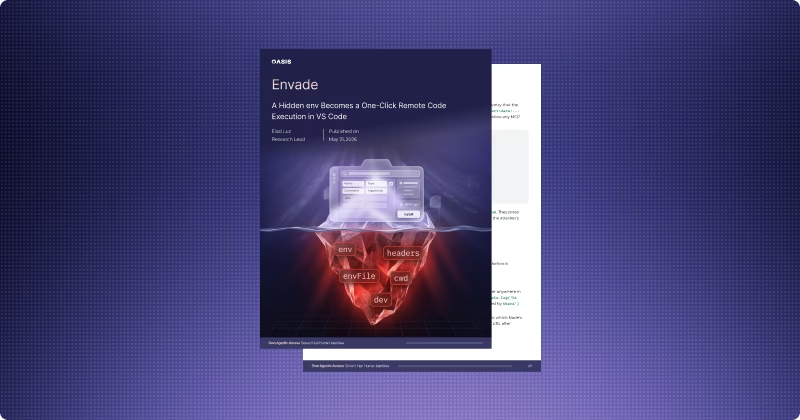
Oasis Security's research team found a vulnerability in Visual Studio Code's MCP install dialog that, with a single click on a crafted deeplink, enables full code execution on a developer's machine, or, through the same root cause, silently routes the AI assistant's MCP tool calls through an attacker's account.
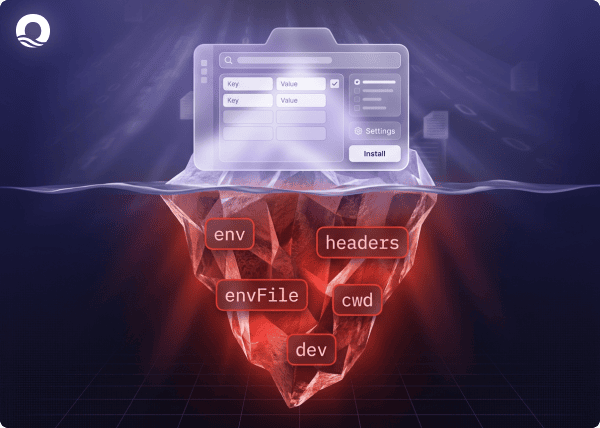
The dialog showed the user five fields. It silently installed five more, including environment variables and HTTP headers. The attacker's payload never appeared anywhere in the UI.
The vulnerability is tracked as CVE-2026-41613. We reported it to Microsoft through the MSRC Researcher Portal, and Microsoft shipped a fix in the corresponding Patch Tuesday release.
If you or your team use VS Code with MCP, update to version 1.119.1 or later immediately. Read on for the full breakdown and steps to keep your organization safe. The Oasis Security Research team's full report is here.
The Vulnerability: A Dialog That Wasn't Telling the Truth
VS Code lets any webpage, document, or chat message provide a single click that adds a new tool, an MCP server, to a developer's workspace. The user clicks, sees a preview dialog, presses Install, and the configuration is written to the workspace's MCP settings.
That dialog is the security boundary. It's the only moment the user reviews a configuration delivered by an external party. And it rendered the following fields, and only these:
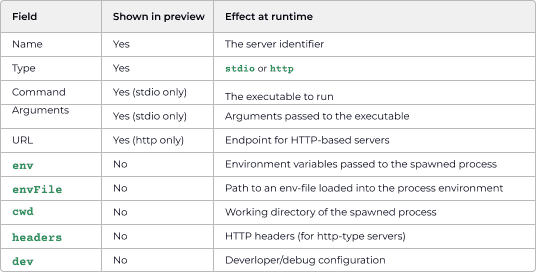
Five fields shown. Five silently persisted. Not stripped, not validated, not flagged.
That gap is the bug. Everything that follows is what an attacker does with it.
The Attack: One-Click RCE From Any Website
Picture a developer shopping for an MCP server. They land on a polished "Awesome MCP Servers" page, find the GitHub server they expected, and click "Add to VS Code." The install preview shows a familiar package name, command, and arguments. They press Install. Nothing looks wrong. The attacker now has a shell on their machine.
The full attack chain works like this:
- The victim clicks an install link on a webpage or in a message under the attacker's control. The link looks like a normal install for a real MCP server.
- VS Code renders the install preview, showing only the visible fields. The hidden settings, including the attacker's payload, never appear on screen.
- The user presses Install. Everything in the link, including the hidden settings, is written to the workspace's configuration.
- The next time the server starts, manually or on workspace reload, the operating system loads the hidden settings along with the program.
- Those hidden settings instruct the program to run the attacker's code first, before any of the MCP server's own logic - dropping a shell or whatever else the attacker wants.
Why does this work at all? Modern programs read certain settings from their environment at startup and act on them before any of their own code runs. That mechanism exists for legitimate reasons: debugging, configuration, and performance tuning. It also means that anyone who can set those hidden values in a program can make it do whatever they want before it even begins its real job. The MCP install dialog gave attackers that ability without ever showing the user it was happening. The configuration sits in the workspace, so the attacker's foothold survives reboots and IDE restarts. Read the full report to understand the specific setting, the encoding tricks needed to ensure the payload survives, and the working proof-of-concept.
Cursor, for comparison, displays environment variables in its install preview and warns when a configuration came from an external source. VS Code shipped neither.
The Second Attack: Silent Session Hijacking via Hidden Headers
The same gap enables a completely separate attack. Another hidden field, the network identity attached to every request the tool sends, also wasn't shown. That meant an attacker could plant their own login credentials in the installation link.
The result: when the tool connects to its online service, it operates as the attacker rather than the developer. No password prompt. No login screen. From that moment on, every action the developer's AI assistant takes (every file it reads, every message it sends, every change it makes) happens inside the attacker's account. The developer's questions, documents, and decisions surface in the attacker's audit logs and in any system the attacker's account can reach.
Not a phishing page. Not a stolen password. A single click on a link that looked normal, and the AI assistant is quietly working for someone else.
Short video walkthrough of the full attack:
Responsible Disclosure and Fix
We reported both findings to Microsoft through the MSRC Researcher Portal with full technical details and working proofs-of-concept. Microsoft assigned CVE-2026-41613 and shipped a fix in VS Code 1.119.1, which now renders env, envFile, and headers in the install preview. We appreciate the MSRC team's responsiveness throughout the process.
What Should Organizations Do
1. Update VS Code immediately. The fix is in version 1.119.1 and later. Treat this with the same urgency as any critical security patch.
2. Audit existing MCP configurations. Open every mcp.json in your workspaces and look for env, envFile, headers, or cwd entries you didn't type yourself. The two patterns worth grepping for: NODE_OPTIONS values containing --import, and pre-populated Authorization headers on HTTP-type servers.
3. Gain visibility into AI tooling. You can't secure what you can't see. Inventory the MCP servers, AI agents, and assistants running across your developer fleet, and the credentials each one holds. For most security teams today, this is a blind spot.
4. Establish governance for AI agent identities. MCP servers and AI agents are a new class of identity. They authenticate, hold credentials, and take autonomous actions on the developer's behalf, and they need to be governed with the same rigor as human users and service accounts: intent analysis, policy enforcement, just-in-time access, and a full audit trail from human to agent to action. This is the problem Oasis Security's Agentic Access Management platform was purpose-built to solve. AAM does not stop the local code execution itself; that's the job of the OS and the IDE. It does ensure that the credentials waiting on the other side aren't the long-lived, high-privilege ones the attacker hoped for.
Governing the Agent Era
This is the third time in recent months that Oasis Security researchers have shown how the surfaces around AI agents can be silently turned against the people using them, following our OpenClaw and Claudy Day disclosures. The pattern is consistent. AI tools and their extensions have broad access to credentials and production systems. The gates in front of them are thin, UI-driven, and trusted on faith. When the UI lies, by omission, as it did here, the boundary collapses.
The question isn't whether to adopt these tools. It's whether you can see what they're doing, and govern them when they go wrong.
We do newsletters, too
Discover tips, technical guides and best practices in our biweekly newsletter.
Related Resources