OpenClaw Vulnerability: Website-to-Local Agent Takeover

Share


Overview
OpenClaw, the open-source AI agent that rocketed to over 100,000 GitHub stars in five days, has become the default personal assistant for thousands of developers. It runs on their laptops, connects to their messaging apps, calendars, and dev tools, and takes autonomous actions on their behalf. It has also, as we discovered, been trivially vulnerable to hijacking from any website the developer visits.
Oasis Security researchers found a vulnerability chain in OpenClaw that allows any website to silently take full control of a developer's AI agent—with no plugins, extensions, or user interaction required. The OpenClaw team classified this as High severity and shipped a fix within 24 hours.
If you or your team run OpenClaw, update to version 2026.2.25 or later immediately. Read on for the full technical breakdown and steps to keep your organization safe.
The Rise of OpenClaw
OpenClaw is a self-hosted AI agent (originally called Clawdbot, then MoltBot) that recently took the developer world by storm, becoming one of the fastest-growing open-source projects in history. Its growth caught the attention of OpenAI: on February 15, Sam Altman announced its creator, Peter Steinberger, had joined the company, calling him "a genius with a lot of amazing ideas about the future of very smart agents.” Users interact with OpenClaw through a web dashboard or terminal, allowing it to autonomously send messages, run commands, manage workflows across platforms, and even form an emergent AI social network.
That power has already attracted trouble. Earlier this month, researchers discovered over 1,000 malicious skills in OpenClaw's community marketplace (ClawHub) —fake plugins masquerading as crypto tools and productivity integrations that instead deployed info-stealers and backdoors. That was a supply-chain problem: community-developed plugins poisoning the ecosystem.
What we found is different. Our vulnerability lives in the core system itself—no plugins, no marketplace, no user-installed extensions —just the bare OpenClaw gateway, running exactly as documented.
For many organizations, OpenClaw installations represent a growing category of shadow AI: developer-adopted tools that operate outside IT's visibility, often with broad access to local systems and credentials, and no centralized governance.
OpenClaw Gateway and Nodes
At its core, OpenClaw runs a gateway, a local WebSocket server that acts as the brain of the operation. The gateway handles authentication, manages chat sessions, stores configuration, and orchestrates the AI agent.
Connected to the gateway are nodes—these can be the macOS companion app, an iOS device, or other machines. Nodes register with the gateway and expose capabilities, running system commands, accessing the camera, reading contacts, and more. The gateway can dispatch commands to any connected node.
Authentication is handled via either a token (a long random string) or a password. The gateway binds to localhost by default, based on the assumption that local access is inherently trusted.
That assumption is where things break down.
The Attack: Taking Over an Agent From Any Website
Here's the scenario. A developer has OpenClaw running on their laptop, with the gateway bound to localhost, protected by a password. They're browsing the web and accidentally land on a malicious website.
That's all it takes.
The full attack chain works like this:
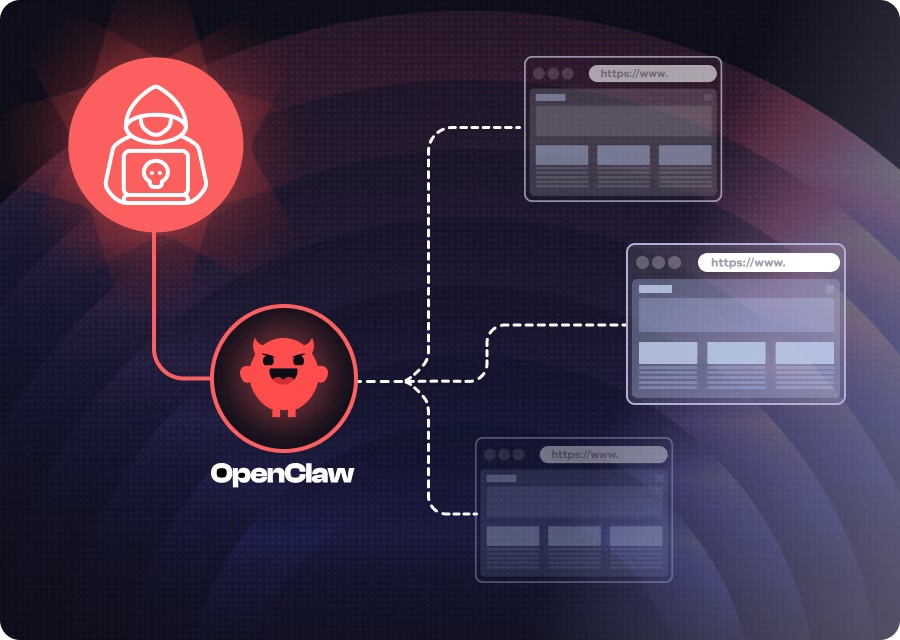
- The victim visits any attacker-controlled (or compromised) website in their normal browser.
- JavaScript on the page opens a WebSocket connection to localhost on the OpenClaw gateway port (permitted becauseWebSocket connections to localhost are not blocked by cross-origin policies).
- The script brute-forces the gateway password at hundreds of attempts per second. The gateway's rate limiter exempts localhost connections entirely.
- Once authenticated, the script silently registers as a trusted device. The gateway auto-approves device pairings from localhost with no user prompt.
- The attacker then has full control. They can interact with the AI agent, dump configuration data, enumerate connected devices, and read logs.
Here's how each step works.
The OpenClaw gateway accepts connections from localhost through a WebSocket, and here's the key issue with WebSockets: any website you visit can open one to your localhost. Unlike regular HTTP requests, the browser doesn't block these cross-origin connections. So while you're browsing any website, JavaScript running on that page can silently open a connection to your local OpenClaw gateway. The user sees nothing.
There's an inherent trust that the gateway places in locally originating connections. This makes sense when you think about the intended use case—local tools like the CLI, the macOS companion app, or the web dashboard all connect from localhost. But the designers likely did not consider this scenario: a third-party website, controlled by an attacker, whose code also runs in the browser and originates from localhost in the context of the connection.
That misplaced trust has real consequences. The gateway relaxes several security mechanisms for local connections - including silently approving new device registrations without prompting the user. Normally, when a new device connects, the user must confirm the pairing. From localhost, it's automatic.
But the attacker still needs the password. And this is where the critical finding comes in: there is no rate limit and no failure limit for password guesses from localhost. The gateway's rate limiter completely exempts loopback connections—failed attempts are not counted, not throttled, and not logged. In our lab testing, we achieved a sustained rate of hundreds of password guesses per second from browser JavaScript alone. At that speed, a list of common passwords is exhausted in under a second, and a large dictionary would take only minutes. A human-chosen password doesn't stand a chance.
Once the password is guessed, the attacker has a fully authenticated session with admin-level permissions. From there, the attacker's script can:
- Send messages to the AI agent and receive responses, effectively taking over the user's agent, asking it questions, and getting answers.
- Dump the gateway configuration, exposing which AI providers, models, and messaging channels are configured.
- Enumerate all connected nodes, seeing every device paired with the gateway, including their platforms and IP addresses.
- Read application logs, gaining operational intelligence.
In practice, this means an attacker could instruct the agent to search the developer's Slack history for API keys, read private messages, exfiltrate files from connected devices, or execute arbitrary shell commands on any paired node. For a developer with typical OpenClaw integrations, this is equivalent to full workstation compromise, initiated from a browser tab.
We demonstrated this end-to-end: from a browser on an unrelated website, our proof-of-concept guessed the gateway password, connected with full permissions, and successfully interacted with the user's AI agent,all without the user seeing any indication that anything had happened.
Responsible Disclosure and Fix
We reported this vulnerability to the OpenClaw security team with full technical details, root cause analysis, and proof-of-concept code. The team classified it as high severity and pushed a fix in less than 24 hours,an impressive response time, especially for a volunteer-driven open-source project.
What Should Organizations Do
The rapid adoption of tools like OpenClaw means many organizations already have instances running on developer machines, often without IT's knowledge. Here's what we recommend:
1. Gain visibility into AI tooling. You can't secure what you can't see. Inventory which AI agents and assistants are running across your developer fleet. OpenClaw instances, local LLM servers, and similar tools represent a growing blind spot.
2. If OpenClaw is installed,update immediately. The fix for this vulnerability is included in version 2026.2.25 and later. Ensure all instances are updated - treat this with the same urgency as any critical security patch.
3. Review the access granted to AI agents. OpenClaw agents can hold API keys for AI providers, connect to messaging platforms, and execute system commands on connected devices. Audit what credentials and capabilities each instance has been granted, and revoke anything that isn't actively needed.
4. Establish governance for non-human identities. AI agents are a new class of identity in your organization - they authenticate, hold credentials, and take autonomous actions. They need to be governed with the same rigor as human users and service accounts. This means intent analysis (understanding what an agent action is trying to do before it happens), policy enforcement (deterministic guardrails that block dangerous actions and require human approval for sensitive operations), just-in-time access (short-lived, per-session, scoped only to the required task), and a full audit trail from human to agent to action to result. This is the problem that Oasis Security's Agentic Access Management platform was purpose-built to solve.
As AI agents become standard tools in every developer's workflow, the question isn't whether to adopt them, it's whether you can govern them.
Related Resources